
Setting the center air vents
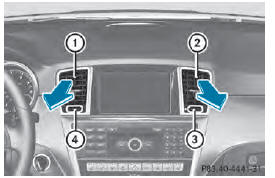
1 Center air vent, left 2 Center air vent, right 3 Center vent thumbwheel, right 4 Center vent thumbwheel, left
■ To open/close: turn thumbwheels 3 and 4 to the right or left.
See also:
Warranty
Your vehicle is covered under the terms of the
warranties printed in the Service and
Warranty Information booklet.
Your authorized Mercedes-Benz Center will
replace and repair all factory-installe ...
Snow chains
WARNING
If snow chains are installed to the front
wheels, they may drag against the vehicle
body or chassis components. This could
cause damage to the vehicle or the tires.
There is a risk of a ...
Program selector button
General notes
The program selector button allows you to
choose between drive programs with
different driving characteristics.
In AMG vehicles, drive program E is called
drive program C.
...